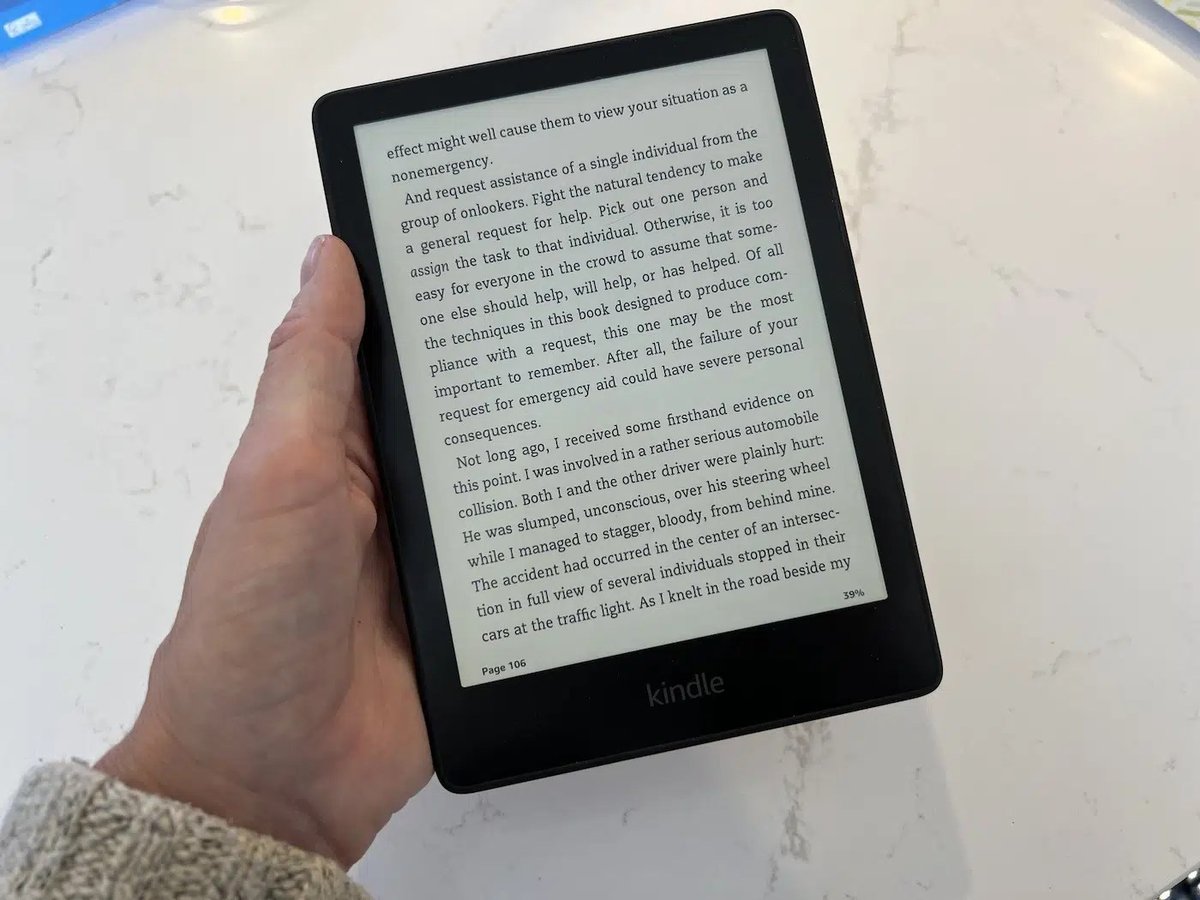
When it comes to dedicated e-readers, the Amazon Kindle Paperwhite has long held a special place in the hearts of book lovers. And for good reason. It’s arguably the perfect blend of features, portability, and price, especially the Kindle Paperwhite 11th Gen Features & Specifications, which we're about to unpack. This model has cemented its status as the go-to choice for most readers, offering an experience that's both familiar and significantly upgraded from earlier Kindles.
Amazon, holding an impressive estimated 75% of the e-reader market in the US and a staggering 90% in the UK, clearly knows what readers want. The 11th Gen Paperwhite, often referred to as the Paperwhite 5, arrived in 2021, bringing with it a suite of enhancements that make reading even more immersive and enjoyable. It struck a balance that made it an instant recommendation for avid and casual readers alike.
At a Glance: What Makes the Kindle Paperwhite 11th Gen Shine
- Bigger, Better Display: A 6.8-inch E INK Carta 1200 touchscreen, offering more reading real estate.
- Crisp Text: 300 PPI (pixels per inch) for laser-sharp clarity, just like real paper.
- Adaptive Lighting: 17 white and amber LEDs provide adjustable warmth, reducing blue light for comfortable nighttime reading.
- Pocket Library: 8GB or 16GB storage options, enough for thousands of books.
- Long-Lasting Battery: Up to 10 weeks on a single charge.
- Waterproof Design: IPX8 rating means it can survive accidental dips.
- Audible Ready: Bluetooth 5.0 for listening to audiobooks.
- Modern Connectivity: USB-C charging and content transfer.
Why the Paperwhite 11th Gen is a Reader's Sweet Spot
Imagine settling into your favorite reading nook, the scent of coffee wafting nearby, and a device in your hand that feels just right. That's the essence of the Kindle Paperwhite. While Amazon offers a range of Kindles, the 11th Gen Paperwhite hit a sweet spot in terms of size, battery life, and cost that made it incredibly appealing. It’s the reliable workhorse of the Kindle family—robust, feature-rich, and genuinely designed for focused reading without the distractions of a tablet or phone.
Before the 11th Gen, the Paperwhite series was already popular. But this iteration brought significant advancements that made it a compelling upgrade for many, and a fantastic entry point for new e-reader users. It's not just about the technical specifications; it’s about how these specs translate into a superior, more comfortable reading experience.
Kindle Paperwhite 11th Gen: What's Under the Hood?
Let's dive into the core features and specifications that define the Kindle Paperwhite 11th Generation. These are the details that matter when you're considering your next e-reader.
The Display: Your Window to Worlds
Perhaps the most impactful upgrade in the 11th Gen Paperwhite is its display. You're getting a generous 6.8-inch E INK Carta 1200 touchscreen. This is a noticeable bump up from previous Paperwhite models and even the standard Kindle, providing more room for text and less frequent page turns.
What does "E INK Carta 1200" mean for you? It means a display engineered to mimic the look and feel of real paper. The 1236 x 1648 resolution paired with a crisp 300 PPI (pixels per inch) ensures that text is incredibly sharp and clear, making long reading sessions comfortable on the eyes. This isn’t a backlit screen like a tablet; it’s a front-lit display that illuminates the surface of the screen, just like shining a soft lamp onto a physical book.
Lighting That Adjusts to You
One of the standout features for serious readers is the advanced lighting system. The 11th Gen Paperwhite includes warm and cool lights, powered by 17 white and amber LED lights. This allows you to adjust the color temperature of the screen, from a cool, crisp white to a warm, inviting amber, mimicking a candlelight effect.
Why does this matter? Amber light helps reduce blue light exposure, which can disrupt sleep patterns. You can schedule the warmth setting to automatically adjust with the time of day, much like a "night mode" on other devices, making it incredibly comfortable for bedtime reading.
Performance for the Page-Turner
Underneath that beautiful display, the 11th Gen Paperwhite houses an MT8113 SOC 1 GHZ processor and 512MB of RAM. While these numbers might not sound like much compared to a smartphone, for a dedicated e-reader, they provide a smooth and responsive experience. Page turns are quick, navigating menus is fluid, and you won't find yourself waiting around when you're eager to get back to your story.
Storage: Room for a Library (or Ten!)
The Kindle Paperwhite offers two main storage configurations: 8GB or 16GB internal storage. For most readers, the 8GB model is generally sufficient and comes at a slightly lower price point. To put it in perspective, a typical ebook file is only a few megabytes. An 8GB Kindle can easily hold thousands of books. Even if you're an avid reader who never deletes books, you'd be hard-pressed to fill it.
The 16GB option is fantastic for those who frequently download graphic novels, manga, or particularly large PDF files, which can consume more space. But for standard novels and non-fiction, 8GB is more than adequate.
Battery Life That Goes the Distance
Forget charging every day. The 11th Gen Paperwhite is equipped with a 1700 mAh battery, designed for marathon reading sessions. Amazon rates its battery life at approximately 10 weeks on a single charge, based on half an hour of reading per day with the wireless off and the light setting at 13. In real-world usage, this translates to weeks of power, meaning you can take it on extended trips without packing a charger. It’s one of those features that simply lets you forget about battery anxiety and focus on your book.
Connectivity: Beyond the Book
While primarily a reading device, the 11th Gen Paperwhite isn't entirely isolated. It features a USB-C port for charging and quickly transferring content from your computer. This modern port is a welcome upgrade from older micro-USB connections.
For those who enjoy listening as well as reading, Bluetooth 5.0 connectivity allows you to pair wireless headphones or speakers to enjoy Audible audiobooks. It's a seamless way to switch between reading and listening to your favorite stories, picking up right where you left off. This integration highlights Amazon’s ecosystem advantage, ensuring a smooth transition between formats.
Life's Little Spills? No Sweat.
Accidents happen, especially when you're reading by the pool or in the bathtub. The Kindle Paperwhite 11th Gen comes with an IPX8 waterproof rating. This means it can withstand immersion in up to 2 meters of fresh water for 60 minutes, or up to 0.25 meters of seawater for 3 minutes. While we don't recommend intentionally dunking it, this rating provides invaluable peace of mind.
To further protect your device, the USB-C port also features moisture detection, preventing charging when wet. This clever safety mechanism helps prolong the life of your device by preventing damage from electrical shorts.
Dimensions & Weight: Hand-Friendly Design
Comfort in hand is crucial for any e-reader. The 11th Gen Paperwhite measures 124.6 x 174.2 x 8.1 mm and weighs 205g. These dimensions make it easy to hold for extended periods with one hand, whether you're lounging on the couch or commuting on public transport. It's light enough to be unobtrusive but substantial enough to feel premium. For more insights on carrying your device, you might want to explore accessories and covers specifically designed for the Kindle Paperwhite 11th Gen.
Customizing Your Reading Experience
Beyond the hardware, the software and customization options truly make the Kindle Paperwhite a personal reading companion.
From Brightness to Warmth: Tailoring Your Screen
The basic function of reading is enhanced by a suite of adjustable settings. You can easily swipe down from the top of the screen to access quick toggles for:
- Brightness: Adjust the intensity of the front light to suit ambient conditions, from bright sunshine to a dark room.
- Wi-Fi: Toggle connectivity on or off to conserve battery when not needed.
- Warmth: As mentioned, you can manually adjust the amber light or set it to a schedule (like a night mode) to automatically shift to warmer tones as the day progresses.
- Dark Mode: For those who prefer white text on a black background, especially in low light, dark mode is a game-changer. It reduces overall screen glare and can be very comfortable for late-night reading sessions.
Making Text Your Own: Fonts, Sizes, and Layout
Every reader has their preferences, and the Paperwhite accommodates them beautifully:
- Font Styles: Choose from a selection of fonts like Bookerly, OpenDyslexic, or Helvetica, each offering a different aesthetic and readability.
- Font Sizes: From tiny to very big (e.g., size 8), you can find the perfect size that minimizes eye strain.
- Margins and Layout: Adjust the margins around your text or pick from preset styles to optimize how text appears on the page. You can even choose line spacing and alignment.
This level of customization ensures that you can create a reading environment that’s perfectly suited to your vision and comfort.
Understanding the Price Tag: What You Get for Your Money
Cost is always a factor, and the Kindle Paperwhite 11th Gen offers excellent value, particularly when you consider its features compared to other e-readers and its own siblings in the Kindle line.
Storage vs. Cost: Making the Right Choice
As discussed, the 8GB model is usually the more budget-friendly option and perfectly adequate for most. Prices for the Kindle Paperwhite generally range from $140 to $170, depending on the storage and ad settings. The 16GB model sits at the higher end of this range, reflecting its increased capacity.
The Ad Factor: Saving a Few Dollars
One of Amazon's unique pricing strategies involves lockscreen ads. You can often purchase a Kindle Paperwhite for a slightly lower price by opting for the "with ads" version. These ads appear as screensavers when your device is in sleep mode. Once you unlock the device, your reading experience is completely ad-free. If you find these sleep-mode ads unobtrusive, it's an easy way to save a few dollars. An ad-free version is also available for a slightly higher upfront cost.
Paperwhite vs. Basic Kindle: Is the Upgrade Worth It?
The basic Kindle, which also received a recent update, typically costs around $100. This makes the Paperwhite 11th Gen a ~$40 upgrade. Is it worth the extra investment? Absolutely. For that $40, you gain:
- A significantly larger, brighter screen (6.8-inch vs. 6-inch on the basic Kindle).
- Adjustable warm light, a crucial feature for comfortable nighttime reading.
- Waterproofing (IPX8), offering peace of mind against spills and splashes.
- A more premium build and feel.
For most dedicated readers, these enhancements easily justify the small price difference, making the Paperwhite the superior choice.
Looking Ahead: How the 12th Gen Paperwhite Elevates the Experience
While this article focuses on the 11th Gen, it's worth briefly noting how the subsequent 12th Gen (often just called the "new" Paperwhite or Paperwhite 6) further refines the experience. The 12th generation builds on the 11th Gen's success, offering some compelling improvements that make it a superior choice, especially as an upgrade from older Kindle models.
A Brighter, Faster Horizon
The 12th Gen boasts a 7-inch E INK Carta 1300 e-paper display with the same 300 PPI, but utilizing an oxide thin-film transistor for an even higher contrast ratio. This translates to slightly crisper blacks and whiter whites. It also features a 25% faster scrolling through libraries and page turns thanks to a Mediatek dual-core 1GHZ processor, making it the fastest Kindle Amazon has produced.
Enhanced Lighting & Battery
The newer model refines the front-light system with 10 White LEDs and 9 Amber LEDs. It also includes a larger 1,900 mAh battery, providing an extended 12 weeks of usage—a noticeable improvement over the 11th Gen's 10 weeks. The Signature Edition of the 12th Gen even includes an ambient light sensor for automatic brightness adjustment, a feature missing from the 11th Gen.
Should You Upgrade?
If you're already an 11th Gen owner, the jump to the 12th Gen might not be immediate for everyone, but it does offer notable performance and display enhancements. For owners of older Kindles, the 12th Gen presents an even more significant leap, making it a highly recommended upgrade. Amazon's commitment to unmatched battery life and display crispness, compared to competitors like Rakuten Kobo and Barnes & Noble Nook, remains a strong selling point across its Paperwhite line.
Accessorize Your Adventure
To protect your investment and personalize your reading experience, Amazon sells a variety of accessories specifically designed for the Kindle Paperwhite. These include cases that click onto the back of the device and feature a front cover that opens like a book, often with magnetic closures that automatically wake or put your Kindle to sleep. They come in various colors and materials, offering both style and protection.
Common Questions About the Kindle Paperwhite 11th Gen
We've covered a lot, but let's quickly hit some frequently asked questions you might still have.
Is 8GB enough for books on the Paperwhite 11th Gen?
Absolutely, for most readers. A typical novel is only a few megabytes. 8GB of storage can hold thousands of ebooks. You'd only typically need 16GB if you plan to store a large collection of graphic novels, manga, or many audiobooks.
Can I listen to audiobooks on the Kindle Paperwhite 11th Gen?
Yes! The 11th Gen Paperwhite includes Bluetooth 5.0. You can pair it with your wireless headphones or speakers to enjoy Audible audiobooks, seamlessly switching between reading and listening.
Is the Kindle Paperwhite 11th Gen really waterproof?
Yes, it has an IPX8 rating. This means it's designed to withstand accidental immersion in up to 2 meters of fresh water for 60 minutes or 0.25 meters of seawater for 3 minutes. Just remember to rinse it with fresh water if it gets exposed to saltwater. Its USB-C port also has moisture detection to prevent charging when wet.
What's the main difference between the 11th Gen and 12th Gen Kindle Paperwhite?
The 12th Gen (newer model) features a slightly larger (7-inch) and higher contrast E INK Carta 1300 display, a faster processor for quicker page turns and library scrolling, a longer battery life (12 weeks vs. 10), and an updated front-light system. The Signature Edition of the 12th Gen also includes an ambient light sensor and 32GB of storage.
Your Next Chapter: Deciding if the 11th Gen is Right for You
The Kindle Paperwhite 11th Gen represents a sweet spot in e-reader technology. It offers a larger, crisper display with adjustable warm lighting, robust battery life, and peace of mind with its waterproof design—all at a price point that's accessible to a wide audience. For many, it's the ideal device for escaping into a good book, free from distractions.
Whether you're looking to upgrade from an older Kindle or purchase your first dedicated e-reader, the 11th Gen Paperwhite remains a compelling choice. It provides a premium reading experience without the premium price tag of more advanced models like the Oasis or the latest 12th Gen Paperwhite. If you prioritize comfort, clarity, and convenience in your reading, the Kindle Paperwhite 11th Gen continues to be a top contender, ready to hold your entire library in the palm of your hand. Explore the Kindle Paperwhite 11th Gen further and see if it's the perfect match for your literary adventures.